- Final Cut Pro
- Premiere Pro
- DaVinci Resolve
Multicam podcasts and social clips, cut automatically for Final Cut Pro, Premiere Pro and DaVinci Resolve
podswitch automatically cuts multicam podcast video for Final Cut Pro, Premiere Pro and DaVinci Resolve, using each speaker’s microphone. Add one recording per speaker and it works out who is talking, then returns a project with the timeline already cut and a dialogue mix with mic bleed removed. On paid plans it also picks the moments most likely to work as short clips and builds them with captions, in vertical, square or landscape, ready in the same editor.
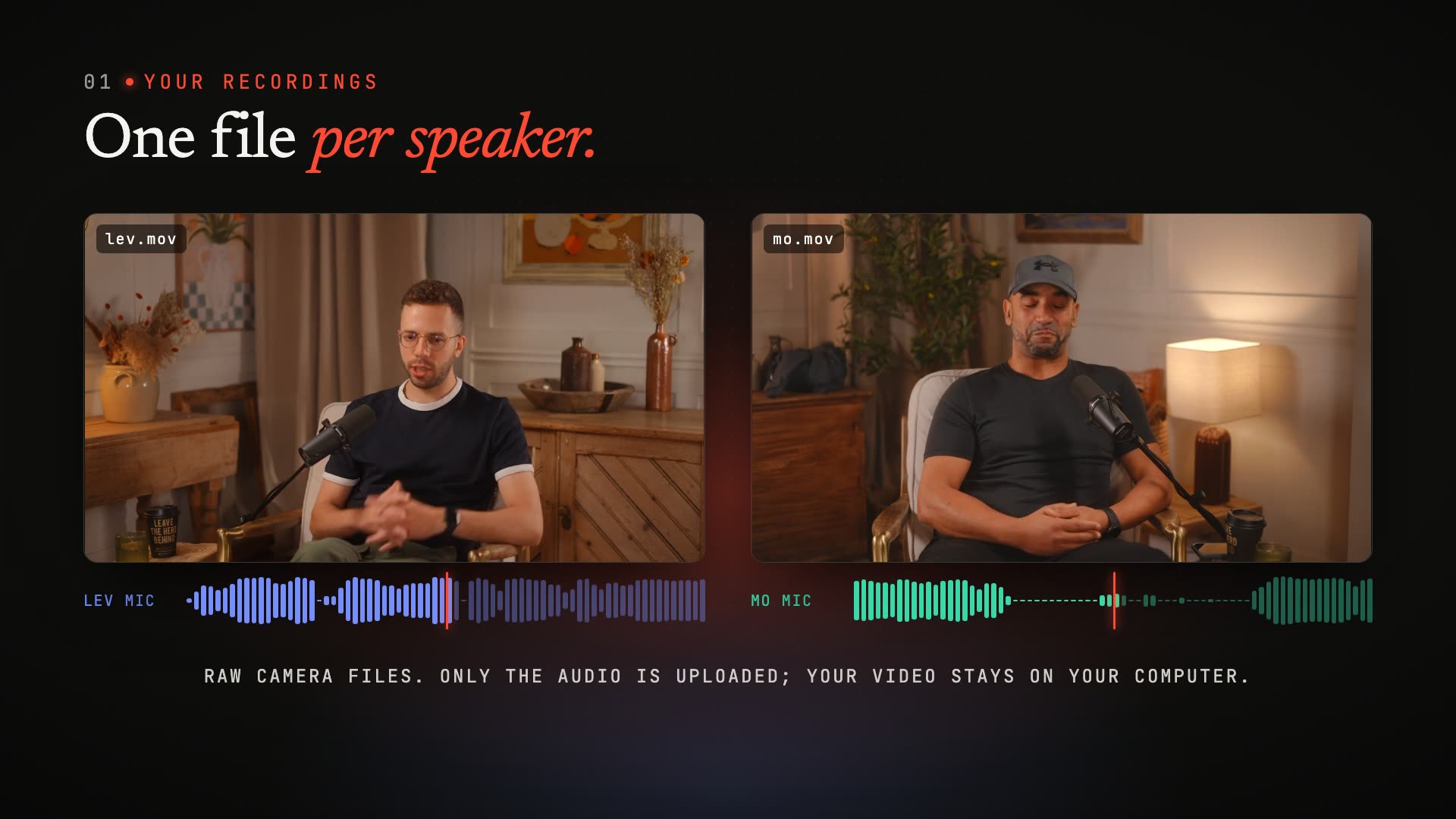
Your video stays on your computer. We only upload the audio.

What is podswitch?
podswitch is an automatic multicam podcast editor by Metamindz. Give it one recording per speaker and it works out who is talking from each microphone, then returns a project for Final Cut Pro, Premiere Pro or DaVinci Resolve with every camera switch already made, plus a dialogue mix with mic bleed removed. On paid plans it also turns the episode into short social clips with captions. Your video stays on your computer: only the audio is uploaded.
- Works with
- Final Cut Pro, Premiere Pro and DaVinci Resolve
- Runs in
- Your web browser, with nothing to install
- Uploads
- Audio only. Your video stays on your computer
- You get
- A pre-cut timeline, a bleed-free dialogue mix, a cut list and, on paid plans, captioned social clips
- Price
- A free plan, and paid plans from £7.99 a month including VAT
- Made by
- Metamindz, in London
How does it work?
- 01
Drop in one recording per speaker
Camera files, a multitrack recorder, or each remote guest’s own track. Your browser pulls the audio out of each video file, so the video itself never leaves your computer.
- 02
podswitch listens to every microphone
It lines the files up by sound, works out who is speaking on each mic, and decides every cut: the person talking, a listener’s reaction on long answers, or the wide shot when people talk over each other.
- 03
Open the edit in your editor
In Final Cut Pro you get a multicam clip with every angle and a timeline that is already cut: change any decision in the Angle Viewer. In Premiere Pro and DaVinci Resolve you get the cut timeline with each camera on its own track.
How does podswitch choose the camera angle?
It measures the level of every microphone many times a second and compares each one against its own noise floor, so a quiet speaker still registers as speaking. At each moment it asks which microphone clearly leads the others.
- 01
One person talking
Their camera.
- 02
Several people talking
Whoever is clearly louder on their own mic. If nobody leads for a couple of seconds and you have a wide camera, the wide shot.
- 03
Silence
After a pause, a listener, usually the person who spoke before, since they are the likeliest to be addressed.
- 04
A long answer
A short reaction shot of a listener, placed where that listener is not talking, so a single angle never runs too long.
A new voice has to hold the floor for a short moment before the edit switches, and every shot has a minimum length. That is why a quick “mm-hm” does not cause a cut. When a switch does happen, it lands a fraction of a second before the new speaker starts, which is how an editor would time it.
No video frame is ever analysed. The decisions come only from the audio.
Your video stays on your computer. We only upload the audio.
Your browser reads each video file locally and extracts its audio. That audio is all podswitch receives, and all it needs: every decision is made from the microphones. Uploaded audio is deleted automatically when your plan’s retention period ends, and it is never used to train models.
What do you get?
- Multicam clip
- In Final Cut Pro: one angle per camera, plus an audio-only angle carrying the dialogue mix.
- Pre-cut timeline
- Every switch already made: the multicam on a timeline in Final Cut Pro, one track per camera in Premiere Pro and DaVinci Resolve.
- Dialogue mix
- Each mic open only while its speaker talks, so bleed from other mics is removed. AAC by default for small downloads, or 24-bit WAV if you want lossless.
- Cut list
- A CSV of every shot, with start, end and angle, for checking or other tools.
- Preview
- Watch the edit in your browser, played from your own files, before you download anything.
- Social clips
- On paid plans: short clips of the strongest moments, picked by AI, with pauses cut, the camera following the speaker and captions, in vertical, square or landscape.
Works with Final Cut Pro, Premiere Pro and DaVinci Resolve
- Multicam clip
Final Cut Pro
A multicam clip with one angle per camera plus an audio angle for the mix, and a timeline with every cut already made. Change any decision in the Angle Viewer. It comes as an FCPXML file: choose File, then Import, then XML.
- Pre-cut timeline
Premiere Pro
A timeline with every cut already made, each camera on its own video track and the mix on the first audio track, on a Mac or on Windows. It comes as an XML file: choose File, then Import.
- Pre-cut timeline
DaVinci Resolve
The same pre-cut timeline, with each camera on its own video track and the mix on the first audio track, on a Mac or on Windows. It comes as an XML file: choose File, then Import, then Timeline.
Social clips open the same way: Final Cut Pro gets editable captions in the project, and every editor gets an SRT file for each clip. To show another camera for a shot in Premiere Pro or DaVinci Resolve, trim one clip and extend the neighbouring camera’s clip. After Effects, Avid Media Composer and other editors are not supported. The Final Cut Pro import guide walks through it step by step.
What do you need to record?
The one essential is a separate microphone for each speaker, recorded to its own track or file. Everything else is flexible:
- A camera and a mic per speaker, with each mic recorded into its camera.
- Cameras for picture and a multitrack recorder for the mics. You map each channel to a speaker.
- Extra cameras with no mic, such as a wide shot, added as angles.
- Remote interviews where each participant’s own file is recorded separately.
Video files can be MOV or MP4. Audio files can be WAV, AIFF, FLAC, M4A or MP3. You do not need timecode or a clapperboard: podswitch syncs every file by comparing its sound with a reference recording.
The recording guide covers it in more detail.
What does it cost?
Prices in pounds, including VAT.
Free
£0
- 3 projects a month
- Up to 20 minutes per recording
- Audio and mix kept for 7 days
Or try one project without an account, up to 10 minutes long.
Paid plans
from £7.99 a month
Premium, billed monthly or annually, with more projects, longer recordings, advanced pacing and social clips.
See all plansOne-off
£29.99 once
- One project beyond your plan, without a paid subscription
- Up to 1 hour per recording
- Up to 4 speakers
- Audio and mix kept for 30 days
As listed on usepodswitch.com on 7 October 2026. The current prices are always on its pricing page.
Questions about podswitch
More in the full FAQ.
What does podswitch do?
podswitch automatically cuts multicam podcast video for Final Cut Pro, Premiere Pro and DaVinci Resolve, using each speaker’s microphone. You give it one recording per speaker; it works out who is talking from the audio and returns a project with a pre-cut timeline, plus a dialogue mix with mic bleed removed.
Which video editors are supported?
Final Cut Pro, Adobe Premiere Pro and DaVinci Resolve. Final Cut Pro gets an FCPXML file that imports as a multicam clip and a pre-cut timeline. Premiere Pro and DaVinci Resolve get a Final Cut Pro 7 XML file: a pre-cut timeline with each camera on its own track and the mix on the first audio track, on a Mac or on Windows. After Effects is not supported.
Do you upload my video?
No. Your video stays on your computer. The browser extracts the audio from each video file and only the audio is uploaded. Every editing decision is made from the microphone audio, and no video frame is ever analysed.
What do I need to record?
One microphone per speaker, recorded to its own track or file. Cameras can record their own audio or you can use a separate recorder: podswitch syncs everything by sound. Extra cameras with no microphone, such as a wide shot, can be added as angles.
How does podswitch sync my cameras and audio?
It compares the sound in every file against a reference recording and finds the offset where they line up, then reports how confident it is. If confidence is low, it pauses and lets you nudge the sync by frames before continuing.
How does podswitch remove mic bleed?
In a room, every microphone picks up everyone. podswitch builds a dialogue mix where each speaker’s mic is open only while that person is speaking and turned down while they are not, with smooth fades so the switch is not audible. When two people genuinely talk at once, both mics stay open.
Can I change how often it cuts?
Yes. Every plan includes three pacing presets: Calm, with longer shots for interviews and long-form conversation, Balanced, the default, and Energetic, with quick cuts for lively, fast back-and-forth. Changing the preset re-runs only the decisions, which takes seconds, and never counts as a new project.
Can I change the edit after it is made?
Yes. You can rename speakers, swap which camera belongs to whom, choose a different pacing preset or change the microphone mapping. podswitch re-runs only the steps affected, and edits never use up any of your plan’s projects.
Is my recording used to train AI models?
No. Recordings are processed only to deliver the service to you and are never used to train models.
Do I need permission from my guests?
Yes. By uploading a recording you confirm that everyone whose voice is in it has agreed to it being processed. For recordings, podswitch acts as a processor on your behalf; see the privacy notice and acceptable use policy on usepodswitch.com.
How much does podswitch cost?
There is a free plan with 3 projects a month, up to 20 minutes per recording. Paid plans start at £7.99 a month, billed monthly or annually, and a single project beyond your plan costs £29.99 once. Prices are in pounds sterling and include VAT. You can also process one recording up to 10 minutes long without an account, using a verified email address.
Who makes podswitch?
podswitch is by Metamindz, a UK technical consultancy and software agency in London. It started as a script that cut a two-speaker podcast for Final Cut Pro, and grew into a product that handles more speakers and extra cameras, syncs every file automatically and makes a bleed-free dialogue mix.
Try it on your next episode.
One free project, up to 10 minutes long, with a verified email address. No account or card needed.
podswitch, by Metamindz
Metamindz is a UK technical consultancy and software agency. We give startups and scale-ups flexible access to CTOs, technical leadership, recruitment and software development, and we make products of our own under the Metamindz Studio name, podswitch among them.
New · Social clips
One episode. Clips for the week.
podswitch reads the conversation and suggests the moments most likely to work as short clips, each with its hook, the reason it was picked and a score. It then builds them: pauses cut, the camera on whoever is talking, captions added, in vertical, square or landscape. They open in your editor like the full edit.
Short clips cut from your episode for Reels, TikTok, YouTube Shorts and LinkedIn.
See social clips
How are social clips made?
podswitch transcribes the episode
As soon as an edit is ready, the dialogue mix is transcribed, with every word matched to the person speaking it.
Claude picks the moments
Tell it how many clips you want, how long, and optionally what to look for or who to feature. It looks for a strong opening line, one clear idea and a payoff that makes sense without the rest of the episode.
podswitch builds each clip
Pauses and dead air are cut out. The camera follows whoever is talking, with short shots of the other person when they react or reply. Captions are timed to the words and laid out for the shape.
You check it and open it in your editor
Preview each clip with your own files, change any camera or cut, then download it for Final Cut Pro, Premiere Pro or DaVinci Resolve.
More on the podswitch blog
A real clip, as podswitch built it
These are the suggestions Claude made for one of our own recordings, with the score it gave each. The clip alongside is the top-scored one, built by podswitch from the two camera files. For this page the captions are burned in; in your editor they stay editable.
The score is the model’s judgement of how well a moment stands on its own as a short clip. It does not predict views: what you post, and when, is up to you.
What is in each clip?
Which plans include it?
Social clips come with paid plans. Each plan includes a number of clips per calendar month; a request that fails does not count.
As listed on usepodswitch.com on 7 October 2026.
Social clips questions
What are social clips?
Short clips cut from your episode for Reels, TikTok, YouTube Shorts and LinkedIn. podswitch transcribes the conversation, picks the moments most likely to land, cuts out the pauses, switches to whoever is talking, adds captions and frames each clip vertical, square or landscape. You get them as timelines for Final Cut Pro, Premiere Pro or DaVinci Resolve.
How does podswitch choose the moments?
An AI model (Anthropic’s Claude) reads the transcript and looks for a strong opening line, one clear idea and a payoff, in a moment that makes sense on its own. Each suggestion comes with its hook, the reason it was picked and a score. The score is the model’s judgement, not a promise of views: you choose what to post.
Are the clips rendered videos?
No. Like the full edit, clips open in your editor as timelines that use your own camera files, already cut and framed, with captions you can edit. You export the final video from your editor, so you can adjust anything first.
Are captions included?
Yes. Final Cut Pro gets editable captions in the project, and every editor gets an SRT file for each clip, timed to the clip. Premiere Pro and DaVinci Resolve import the SRT onto a captions track.
What happens to my audio for social clips?
The dialogue mix is transcribed by AssemblyAI in the EU, and the transcript, with the speaker names you entered, is sent to Claude to choose the clips. Neither may use it to train their models. Your video is never uploaded.
Which plans include social clips?
Paid plans. Each plan has a number of clips per calendar month, shown on the pricing page. Clips made by a request count against it; a request that fails does not.